One of the design students at London Royal College of Art has designed
a posh Faucet that helps save water by causing it to form spiral swirls
that are not only stunning to observe but also beautiful when in use.
Simin Qiu, the creator, and designer of this concept designed the faucet
such that it passes water via a double turbine.T he latter rotates as
the water courses through it thus bring about a lattice of elaborate and
beautiful jets of water. Less water is used to form this intricate
swirls, in fact, it reduces the flow of water by 15%. This means that
less water is utilized at any point in time, thus saving you water.
Three nozzles are available all creating different water swirl patterns.
The Design concept award in 2014
was awarded to Qiu for this concept. In order to retain the sleek and
elegant design, the operation of this faucet is carried out with a
simple touch button at the top.
Your customers buy your interpretation, not your product
Mackenzie Freemire
Let’s be real here, what you’re selling can probably be found somewhere else.
A
lot of entrepreneurs swear me to secrecy to not share their top-secret
startup idea with anyone else — but what I don’t tell them is that I’ve
actually heard their idea before because another entrepreneur is
currently working on it.
First-to-market is complete baloney if it’s not aligned with great execution, and the numbers show that most startups don’t last long enough to make a mark even if they do carry this badge.
Someone else will always be selling a variation of your product or service. That’s a given.
Despite
this, your customers actually don’t care that your product exists
elsewhere because that’s not the reason why they buy from you.
Customers Buy Your Interpretation, Not Your Product
Customers buy from you because of the unique interpretation you bring to that product.
This
is why there are rows of organic chocolate bars to choose from at the
grocery store and why there are hundreds of takeout restaurants in your
neighborhood that are still in business.
Different interpretations delight different folks.
The
businesses that thrive are the ones that understand their lack of
specialness in this big world and capitalize on the interpretation that
they bring to the table.
They understand that their interpretation of fair trade, vegan, organic dark chocolate is going to appeal to their people.
They
understand that their competitors can copy their products all they
want, but that their customers buy from them because their YouTube
channel has that hilarious host who somehow makes content about
harvesting cocoa super entertaining.
Interpretation is the personality, style, perspective, and narrative that a brand brings to a product.
Ideas Are Easy To Steal, But A Brand Is Not
You
are missing the point if you spend the majority of your time protecting
your startup idea. Ideas are easy to steal, and the cat’s out of the
bag as soon as you put your product on the market.
Ideas are easy to steal but a brand is not.
Why not focus your energy on the asset that can’t be stolen rather than the one that’s easy to copy?
The
companies that go out of business because of copycats do so because
they made their business dependant on the product and not their
interpretation of the product.
They spent their time on the wrongform of intellectual property.
Go into your business with the mindset that your product can and may be copied, but that your brand will be hard to steal.
Have
you seen a copycat try to steal a competitor’s brand or style before?
It’s usually terrible, really cheesy, and you can tell that it’s a fake
from a mile away.
It’s
like buying a fake Chanel bag and noticing that the iconic double C’s
are crooked and that the stitching doesn’t line up at the seams.
Steal the idea all you want, but style can’t be faked.
Seizing opportunities: what is an opportunity? An opportunity is anything that provides you with a chance to change your circumstances for the better. Are opportunities everywhere? Yes and no. According to Adam Sicinski, “many of the opportunities we come across are actually disguised as problems or hard work. However, to the untrained eye — unable to see past the present moment — all opportunities are actually insurmountable problems that make life difficult, stressful and hard.”
That is where the mistake is made: seeing problems as “problems” rather than challenges that test and strengthen your determination. “The moment you shift your perspective and begin seeing your problems as challenges is the moment you begin training your brain to spot opportunities. Problems may very well be insurmountable. However, a challenge is something you can work with to better your current circumstances.”
As you can see, it is all about your attitude whether there are opportunities for you.
Seizing opportunities with the opportunistic mindset
According to Sicinski, there are certain indispensable qualities that separate a successful person from others who struggle to take advantage of the opportunities that life throws their way. You need to foster and cultivates these qualities every single day.
Curiosity
Opportunity desires a curious mind that is always asking deeper and more insightful questions.
Generosity
Opportunity desires a generous heart that is willing to give opportunities to others.
Perseverance
Opportunity desires someone who has determination, who will keep persisting and persevering despite the seemingly insurmountable obstacles that stand in their way.
Confidence
Opportunity desires a confident demeanor — someone who never doubts their skills, strength, resources, and abilities.
Optimism
Opportunity desires an optimistic attitude that does not end if things do not go as expected.
Playfulness
Opportunity desires a light-hearted approach that is willing to be a little creative, willing to think outside the box, and willing to break conventional rules.
Responsibility
Opportunity desires someone who is fully committed and responsible for their decisions, behavior and actions, someone who does not make excuses or blames others.
Hindsight
Opportunity desires someone with hindsight who can see beyond this fleeting moment into the future. This person understands that what might look like a problem now might actually be a once in a lifetime opportunity.
Gratitude
Opportunity desires a grateful spirit that is thankful for anything that life throws its way, no matter how dark or grim it might seem on the surface.
Seizing opportunities: the main beliefs and attitudes related to opportunistic thinking
Steven Handel agrees with Sicinski, saying that “opportunity is just as much dependent on our views and attitude about the world as it is on our external circumstances. When we actively change our thinking and perception toward a more opportunistic mindset, we can actually invite and take advantage of more opportunities in our daily lives.” He reckons there are some main beliefs and attitudes that correlate with seizing opportunities and opportunistic thinking:
Believe in free will
Those who do not believe they have any will-power or control over their lives are going to automatically inhibit themselves from taking advantage of the opportunities that pass us by on a daily basis. We are conscious thinkers and actors that participate in our environments.
Be open to a possibility
To be an opportunist, we cannot be stubborn in our thinking, and we cannot limit our beliefs and map of reality to a single narrow perspective. Instead, we have to show openness to new perspectives, new ideas, and new beliefs that we may not have previously considered. It allows for more creative ways of interpreting information and applying it in new and unconventional ways.
Seizing opportunities: take quick action
An opportunist does not spend too much time waiting, hoping, or praying for some ideal situation. They know that the quest for perfection often leads to procrastination. Instead, they stay vigilant for the little (but imperfect) opportunities that pass us by on a daily basis, and they take advantage of these opportunities soon after they present themselves.
Be aware
Our ability to discover new opportunities is intrinsically dependent on our awareness of our environment and our surroundings. Techniques that help build awareness can help us process the information we get from our environment with a greater scope and clarity. Having this increased awareness greatly increases our chances of discovering new opportunities. It also improves skills in problem solving and creativity. Be aware of your awareness, because it plays a huge role in how you process the world.
Learn optimism
Optimism is a positive perspective we hold about life, encompassing beliefs and thought patterns such as believing that good things will happen to you, that you can overcome obstacles and that you are capable of achieving your goals. Optimism is not something we are predestined or born with, but something we can learn and cultivate on our own.
Seizing opportunities: how to identify them
Sicinski urges you to identify first what it is you want: “how in the world are you supposed to identify any opportunities that come your way if you are not clear about what it is you want in the first place? Unless you know exactly what it is you are looking for, then how exactly are you supposed to find it?” Then, you need to identify several things that may hold you back from taking advantage of the opportunities that life throws your way.
Look at your beliefs and identify if there are any unhelpful beliefs that could potentially prevent you from taking advantage of opportunities.
Look at your strengths and weaknesses, and evaluate how they can help or hinder you throughout this process.
Identify your risk tolerance. This is important because the more risk you are willing and able to take, the more chances/opportunities you will be able to take advantage of.
Your assessment of these areas will help you to understand yourself, your motivations, your limitations, and the actions you are willing or unwilling to take when opportunities present themselves.
Seizing opportunities: how to spot them
The next step for Sicinski is to spot opportunities. Rajesh Setty has also written a blog about this, which I will present later. Sicinski suggests there are three things you need to do to spot opportunities:
Seizing opportunities: be in a state of readiness
The single most important thing to consider when looking for opportunities is to be in a state-of-readiness for any opportunities that may come your way. You must be constantly on the lookout for anything that could possibly help you achieve your goals and objectives far more quickly, effectively or cheaply. It also means that you must be open to new perspectives and ideas. The key to this awareness lies within your willingness and ability to ask the right kinds of questions. The more you ask questions, the more curious you will become. As a result, you focus your mind on the right events, people, things or circumstances that can help you move forward in the best possible way.
Search for clues
Once you are in the habit of asking questions that help spark your curiosity, it is time to filter through the clues leading you to unique opportunities that present themselves. They can come in many forms and will be very specific to the types of opportunities you are looking for. However, certain types of clues can come in the form of trends, problems that people face or things that they complain about, gaps in the market, and unusual patterns, events or circumstances. All of these clues can provide you with an opportunity to do something different, new or unusual. It helps to keep a sketch/notebook of your random thoughts and observations as you go about your day.
Expand your reach
In order to improve your ability to spot opportunities further, it is critical that you expand your reach by learning new skills, by regularly networking with people who may be able to support you in your endeavors, and by acquiring new resources that will help expand your life resources list. In addition, you will naturally expose yourself to more opportunities by attempting new things.
Similar ideas
Setty has similar ideas on how to go about spotting opportunities. He uses examples of working in a firm, but it can apply to entrepreneurs looking for new business ideas as well. He says: “Look for gaps, more responsibility, bigger problems, and knowledge arbitrage, and look to listen.”
Seizing opportunities: how to
What is the secret to seizing opportunities? Well, not all opportunities are worth pursuing (you simply cannot take them all up), so you need to focus on the key ones. Sicinski says there are three things you need to do in order to capitalize on the opportunities that help you accomplish your goals and objectives:
Step outside your comfort zone
Many of the opportunities will stretch and challenge you in a variety of ways. This may mean that you must step into a world of uncertainty. Take a few risks that you were not expecting to take. Each of these risks will have its own consequences. You must weigh them against the benefits and decide whether it is a risk worth pursuing.
Seizing opportunities: the small ones count
Not all opportunities are created equal, but it is not the size of the opportunity that matters. What you do with that opportunity is what makes all the difference in the end. Therefore, you should never underestimate or discount what an opportunity can do for you. Who knows, a small opportunity here could very well lead to bigger opportunities in the future. You just have to be willing and ready to take advantage when the moment arrives.
Network with creative people
Focus on networking with the right kinds of people. They should have the resources, contacts, experience, and skills to help you achieve your goals and objectives. Above all, network with creative people. These people think outside the box. They constantly challenge you to think differently about your life, goals, problems, and circumstances.
Roadblocks to avoid when seizing opportunities
Now you know what to do, you also need to know what not to do. Not surprisingly, these actions are the opposite of the main beliefs and attitudes related to opportunistic thinking. Sicinski has a few tips for what not to do when trying to find and seize opportunities. Sicinski mentions following the crowd, seeking security and comfort, and waiting for opportunities to arrive. He also mentions succumbing to uncertainty, to fear of rejection or fear of making mistakes. Finally, keep clear of pessimism and skepticism.
David Finch, however, has written a more extensive blog post on this. Unfortunately, this blog post is now offline as he has passed away. He said that the biggest roadblock to accomplishing anything is not being able to recognize opportunities when they are presented. To be able to see opportunities and act upon them, you need to overcome five main roadblocks:
Fear
The biggest roadblock is the fear of the what-ifs. What if this does not work, I fail, or I lose all my money? There is nothing wrong with wondering about the unknown. However, the moment you are unable to pull the trigger you have missed an opportunity to move forward.
Past failures
No one likes the sting of failure. It produces scars that can last a lifetime. Try to get past the sting. After that, you should be able to gather the information that will be helpful in your next venture.
Lack of awareness
This is discussed in the part about the opportunistic mindset. If you cannot see it, you will never be able to seize it. Most often, a lack of awareness can be boiled down to lack of exposure and lack of knowledge.
Lack of self-confidence
Lack of confidence will always keep you in the ‘would have, should have, could have’ mode. Confidence comes by trusting your knowledge and be willing to take a leap of faith.
Closed mind
If you are unwilling to look at things from a different perspective, you abort the opportunity of moving forward.
Seizing opportunities: 3 ways to turn your challenges into opportunities
Advancedlifeskills.com (website now offline) says that there is often only a small degree of difference between a positive, optimistic perception and a negative, pessimistic one. Even though these two attitudes are polar opposites, they both often start with the same challenges. Advancedlifeskills.com warns us that if our first response to any given situation is negative, it makes a positive outcome much more difficult to achieve. Training ourselves to respond positively or at least neutrally will have the opposite effect. An optimistic response to new challenges will trigger a completely different set of established response patterns. Our subconscious will look for similarities between this situation and our initial response to positive experiences from our past. Advanced Life Skills offers us three ways to turn our challenges into opportunities:
Liberate yourself – accept responsibility
The first step is to recognize that we are in control. We need to accept responsibility for our responses and recognize that they assert a powerful influence on our lives. Until we accept responsibility, we will not have any reason to change. Accepting responsibility is a wonderfully liberating experience. It means that you are in control, not the circumstances.
Use leverage
Leverage means that you exert the greatest amount of control with the least amount of effort. The time to do this is during the first few moments whenever you are faced with new challenges. Once you start down a negative road, it is much more difficult to reverse your course. If you control your first step, you start out in the right direction. It is much easier to maintain that direction.
Seizing opportunities: turn it into a game
When we take life too seriously, it is easy to overreact to situations. If you tend to react negatively to challenges, try imitating somebody who always reacts positively. Role-playing makes it much easier and fun to break ingrained habits than trying to tackle them head-on. You might feel self-conscious imitating somebody else, but no one will notice. What they will notice is how you respond positively to the challenges you face. In return, they will respond to you in a positive way.
What can I do for you when it comes to seizing opportunities?
credit.
Greetje den Holder.
EXCLUSIVE — Beware, if you are using a Xiaomi's Mi or Redmi smartphone, you should immediately stop using its built-in MI browser or the Mint browser available on Google Play Store for non-Xiaomi Android devices.
That's because both web browser apps created by Xiaomi are vulnerable to
a critical vulnerability which has not yet been patched even after
being privately reported to the company, a researcher told The Hacker
News.
The vulnerability, identified as CVE-2019-10875 and discovered by security researcher Arif Khan,
is a browser address bar spoofing issue that originates because of a
logical flaw in the browser’s interface, allowing a malicious website to
control URLs displayed in the address bar.
Since the address bar of a web browser is the most reliable and
essential security indicator, the flaw can be used to easily trick
Xiaomi users into thinking they are visiting a trusted website when
actually being served with a phishing or malicious content, as shown in
the video demonstration below.
The phishing attacks today are more sophisticated and increasingly more
difficult to spot, and this URL spoofing vulnerability takes it to
another level, allowing one to bypass basic indicators like URL and SSL,
which are the first things a user checks to determine if a site is
fake.
The Hacker News has independently verified the vulnerability using a PoC
the researcher shared with our team and can confirm it works on the
latest versions of both web browsers—MI Browser (v10.5.6-g) and Mint Browser (v1.5.3)—that are available at the time of writing.
What's interesting? The
researcher also confirmed The Hacker News that the issue only affects
the international variants of both the web browsers, though the domestic
versions, distributed with Xiaomi smartphones in China, do not contain
this vulnerability.
"The thing that struck me most was that only
their overseas or, international versions were having this security bug
and not their Chinese or, domestic versions. Was it done deliberately
thus?" Arif told The Hacker News in an email.
"Are Chinese device manufacturers intentionally making their OS,
applications, and firmware vulnerable for their international users?"
Another interesting though weird thing is that upon reporting the issue,
Xiaomi rewarded the researcher with a bug bounty, but left the
vulnerability unpatched.
"The vulnerability impacts millions of users
globally yet the bounty offered as such was, $99 (for Mi Browser) and
another $99 (for Mint Browser)," the researcher said.
We also reached out to Xiaomi two days prior to publishing this report
for additional comment and learn if the company has plans to release a
patched version anytime soon, but the mobile vendor provided a weird
response.
"I would like to inform you that as of there
is no official update regarding the issue. However, would request you to
stay connected with the forum page for further details in this
regards," the company said.
This is the second recently-disclosed severe issue that researchers have
identified in pre-installed apps on more than 150 million Android
devices manufactured by Xiaomi.
Just yesterday, The Hacker News published details of a report explaining how attackers could have turned a pre-installed security app on Xiaomi phones, called Guard Provider, into malware by exploiting multiple vulnerabilities in the app.
The bottom line: Android users are highly advised to use modern
web browsers that are not affected by this vulnerability, such as Chrome
or Firefox.
Besides this, if you are using Microsoft Edge or Internet Explorer browser
on your desktop, you should also avoid using them since both browsers
also contain a critical vulnerability which has not yet been patched by
the tech giant.
Have something to say about this article? Comment below or share it with us on Facebook, Twitter or our LinkedIn Group.
It's more important than ever to manage your passwords online, and also harder to keep up with them. That's a bad combination. So the FIDO Alliance—a consortium that develops open source authentication standards—has pushed to expand its secure login protocols to make seamless logins a reality. Now Android's on board, which means 1 billion devices can say goodbye to passwords in more digital services than seen before.
On Monday, Google and the FIDO Alliance announced that Android has added certified support for the FIDO2 standard, meaning the vast majority of devices running Android 7 or later will now be able to handle password-less logins in mobile browsers like Chrome. Android already offered secure FIDO login options for mobile apps, where you authenticate using a phone's fingerprint scanner or with a hardware dongle like a YubiKey. But FIDO2 support will make it possible to use these easy authentication steps for web services in a mobile browser, instead of having the tedious task of typing in your password every time you want to log in to an account. Web developers can now design their sites to interact with Android's FIDO2 management infrastructure.
"Google
got involved in FIDO quite some ways back, particularly because of
phishing, which we think is one of the biggest issues of authentication
on the web today," says Christiaan Brand, a product manager at Google
focused on identity and security. "The natural evolution was looking
toward FIDO2. Customers are already used to using these sensors on the
device for authenticating into applications every day, so how do we make
that technology available to websites?"
Developers
can implement FIDO2 authentication in a number of different variations
depending on what makes sense for their product, but all the versions
offer additional phishing protection by requiring user participation
during sign-in (like doing a fingerprint scan or producing a dongle) so
attackers can't get as far with usernames and passwords alone.
FIDO2 and a related standard, WebAuthn, created by the FIDO Alliance and the World Wide Web Consortium, have gained ubiquity
through adoption by all the major browsers—except Safari, though Apple
has hinted it will add support—and platforms like Microsoft account
sign-in. But Android represents a big step, because it will enable a
major subset of mobile developers to start offering universal
password-less logins. Google's Brand points out that under FIDO2,
developers will even be able to streamline their mobile browser and set
up password-less login on the web, using that authentication step carry
over to a service's app or vice versa.
"We got to
the point where it was implemented in browsers, but now we’re seeing
FIDO technology sedimented in an even broader user base," according to
Andrew Shikiar, chief marketing officer of the FIDO Alliance.
Since
Android is open source and can be deployed by device manufacturers in
all different ways, the platform has issues keeping the global
population of devices up to date with the latest operating system and
features. But Brand says that Google is releasing the FIDO2 update
through a mechanism called Google Play Services that will allow it to
reach almost all devices running Android 7 or later, without
manufacturers needing to do or adapt anything. What this means is the
update will actually be able to get to most of Android's massive user
base.
Though FIDO2 support will allow Android to
accept secure web logins using dongles, NFC, and Bluetooth, Google is
envisioning fingerprint authentication as the easiest approach, and the
one that is likely to become most popular with users. And both Google
and the FIDO Alliance emphasize that in all of this, your fingerprint
data is still always stored locally on your device and isn't sent
anywhere else or held by any other party. The sensor creates a
cryptographic signature from your fingerprint data that is then used in
FIDO2's authentication scheme.
"Providing the
FIDO2 option gives really strong identity protection for account
holders," says Kenn White, director of the Open Crypto Audit Project.
"You and I might be fooled by 'paypa1.com,' but a FIDO key won’t be.
Among the security community, WebAuthn, which FIDO2 intersects with, is
considered one of the strongest account protections there is."
Though
FIDO2 promises a much easier web security experience for users, it will
take time to achieve adoption anywhere near as universal as traditional
password schemes. And digital identity experts warn that any single
credential, no matter how robust, is always more secure when paired with
a strategic second authentication factor. Unfortunately, even in a
glorious utopia free of passwords, there’s never a magic bullet for
account security.
A year ago, when Apple rolled out the iPhone X, one of their most
touted features was facial ID. You no longer needed to press a home
button or use a passcode. You could unlock your phone with your face. It
was the first time I’d really seen facial recognition software being
practically used. You probably use something every day with facial
recognition software even if you don’t realize it—I’m looking at you
Snapchat and Instagram face filters.
Facial recognition is actually becoming a usable reality and not in
the scary way we’ve seen in sci-fi movies. It’s now in several consumer
tech devices. Almost every major phone company has a phone with some
form of facial recognition built in. Companies are even pitching it for
ideas from policing to retail.
So how long will it be until we see it everywhere? As more companies
realize how convenient the tech is we’ll likely see it more often. Let’s
discuss the current opportunities companies are seeing and what
roadblocks we must overcome to get us to the ubiquity of facial
recognition software.
Real Life Opportunities Making Headlines
Facial recognition is doing some amazing things when it comes to
security. From airports to retail establishments, this tech is taking
the customer and employee experience to new heights.
Recently, at the Washington Dulles Airport,
facial recognition technology caught an imposter trying to enter the
United States on a fake passport. The passport may have passed at face
value with humans and without the technology present according to
federal officials investigating the case. The biometric technology was
just three days old when the individual was caught, cementing its
usefulness.
This use is just one of the many new uses for facial recognition software. In fact, the others uses might surprise you.
Preventing crime in retail: Facial recognition
software is being used to instantly identify known shoplifters after
they enter a retail store. Photographs can be matched against databases
of criminals to alert loss prevention and security professionals. This
tech is already reducing crime in these locations drastically.
Mobile phone security: As I mentioned above,
mobile devices like iPhone X, Google’s Pixel 2, and Samsung’s Galaxy
Note 9 all come with facial recognition installed as the unlock feature.
You don’t have to worry about someone stealing your passcode to get
into your phone.
Advertising: As if your marketing team didn’t have
enough updates to make, facial recognition could be next. Companies are
installing screens at gas stations that have this technology built-in.
This helps to target and personalize the customer experience by guessing
age and gender for tailored ads.
Helping the missing: Facial recognition is the
perfect tool for finding missing children. Added to a database,
individuals can be recognized and then local enforcement can be notified
immediately. Companies such as are using facial recognition to help the
blind look for social cues such as smiling.
Helping the Impaired: In what will probably go down as the one of the best—and most emotional—ways to use facial recognition, Listerine
created an app a few years ago that helped blind people know when they
were being smiled at. When the app detected a smile it would vibrate
letting the user know. Smiles are probably something you take for
granted—I know I do!
Social Media: When was the last time you uploaded a
group photo to Facebook? Did the social giant correctly guess who your
friends were in the picture? You can thank facial recognition software
for that.
There are many other uses that could be added to this list. For
facial recognition, the opportunities are endless. But to get us to a
point where it’s a part of our daily lives, we still have a few
roadblocks to overcome. Facial Recognition Software Roadblocks: What’s Holding Us Back?
Unfortunately, some facial recognition software programs haven’t had
smooth sailing after debuting. A few programs, including Amazon’s
Rekognition face-identifying software have been the perpetrator of
racial biases.
In July, a facial recognition software sold by Amazon mistakenly
identified 28 members of Congress as people who had been arrested for
crimes. The test misidentified people of color at a high rate, 39
percent. Unfortunately, because of this error rate, facial recognition
has a little ways to go before it is readily usable for all.
And to make matters worse, no real answer has been created to solve
this issue. In order for the tool to be used effectively by law
enforcement and other entities, the bias has to be eliminated.
Facial recognition also walks the fine line of convenient and creepy.
Some companies are pitching it as a retail solution, where, with the
addition of barcode scanners, you’re tracked around a store and you pay
with your face. It sounds convenient, like the Amazon Go store in
Seattle, but it could become an issue if the facial data is sold to
outside companies. Companies that use this technology would have to
develop an ironclad privacy agreement and be fully transparent with
customers in order to secure their trust. The Future...is Near?
Facial recognition is coming and it may not be far off. With its many
uses and potential opportunity, there’s a lot of growth coming. It’s
easy to see how convenient this technology will make our lives, but
before we can embrace it fully companies will have to overcome the
obstacles in the way.
I am a principal
analyst of Futurum Research and CEO of Broadsuite Media Group. I spend
my time researching, analyzing and providing the world’s best and
brightest companies with insights as to how digital transformation,
disruption, innovation and the experience economy are.
Reminder—If you've forgotten about any Google app after using it once a
few years ago, be careful, it may still have access to your private
emails.
When it comes to privacy on social media, we usually point fingers at Facebook for enabling third-party app developers to access users personal information—even with users' consent.
But Facebook is not alone.
Google also has a ton of information about you and this massive pool of
data can be accessed by third-party apps you connect to, using its
single sign-on service.
Though Google has much stricter privacy policies about what developers
can do with your data, the company still enables them to ask for
complete access of your Google account, including the content of your
emails and contacts.
The entire Facebook's Cambridge Analytica privacy saga
highlights how crucial it is to keep track of the apps you have
connected to your social media accounts and permitted to access your
data.
Last year, Google itself promised to stop scanning the inboxes of Gmail
users for data-driven advertisements, but the company reportedly is
still giving outside app developers the ability to snoop through
hundreds of millions of private Gmail messages that flow through the
email service on a regular basis.
A new report
by the WSJ yesterday highlighted how Gmail's ambiguous app permissions
have left your personal emails vulnerable to hundreds of third-party
developers who can read nearly every detail from your most sensitive
emails, including the recipient's e-mail id, timestamps, the entire
email body.
This is because Google allows third-party app developers to build
services that work with its Gmail platform, like "email-based services,"
"shopping price comparisons," and "automated travel-itinerary
planners," and millions of users who have signed up for any of such
services are at risk of having their private messages read by outside
app developers and their employees.
Obviously, such apps get consent from users to access their inboxes as
part of the opt-in process, but the news that third-party app developers
could read your emails, which usually contains sensitive data, may come
as a surprise to users who did not understand what they signed up for.
A Google spokesperson told the publication that the company examines all
outside app developers before giving access to its service and if it
"ever run into areas where disclosures and practices are unclear, Google
takes quick action with the developer."
However, unlike Facebook's Cambridge Analytica case,
there's no evidence of any third-party Gmail add-on developer has
misused your data, just being their ability to view and read private
emails, which itself seems like a privacy nightmare.
How to Check and Remove Third-Party Apps Access with Your Gmail Inbox
It is time to review all the third-party apps which have access to your
Gmail inbox and revoke access if you find any of them untrustworthy or
unnecessary, as your email data is much more sensitive than your data on
any other social media platform.
This is the only precaution you can take right now. Here's how to do it:
Head on to your Google's "My Account" page and log in with your Gmail credentials if you have not already.
Once logged in, you will be able to see and review all the
third-party apps you have given access to your Google accounts,
including Gmail.
Apps with access to your Gmail inbox will have a label called "Has access to Gmail" beneath its entry.
Since Google currently does not provide a way to get rid of just the
Gmail access, you can completely disable that app's access by hitting
the "Remove Access" button.
You can also share your feedback with the tech giant if you find any site or app getting unnecessary permission to your Google account.
If your mobile carrier offers LTE, also known as the 4G network, you need to beware as your network communication can be hijacked remotely.
A team of researchers has discovered some critical weaknesses in the ubiquitous LTE mobile device standard that could allow sophisticated hackers to spy on users' cellular networks, modify the contents of their communications, and even can re-route them to malicious or phishing websites.
LTE, or Long Term Evolution, is the latest mobile telephony standard used by billions of people designed to bring many security improvements over the predecessor standard known as Global System for Mobile (GSM) communications.
However, multiple security flaws have been discovered over the past few years, allowing attackers to intercept user's communications, spy on user phone calls and text messages, send fake emergency alerts, spoof location of the device and knock devices entirely offline.
4G LTE Network Vulnerabilities.
Now, security researchers from Ruhr-Universität Bochum and New York University Abu Dhabi have developed three novel attacks against LTE technology that allowed them to map users' identity, fingerprint the websites they visit and redirect them to malicious websites by tampering with DNS lookups.
All three attacks, explained by researchers on a dedicated website, abuse the data link layer, also known as Layer Two, of the ubiquitous LTE network.
The data link layer lies on top of the physical channel, which maintains the wireless communication between the users and the network. It is responsible for organizing how multiple users access resources on the network, helping to correct transmission errors, and protecting data through encryption.
Out of three, identity mapping and website fingerprinting developed by the researchers are passive attacks, in which a spy listens to what data is passing between base stations and end users over the airwaves from the target's phone.
However, the third, DNS spoofing attack, dubbed "aLTEr" by the team, is an active attack, which allows an attacker to perform man-in-the-middle attacks to intercept communications and redirect the victim to a malicious website using DNS spoofing attacks.
What is aLTEr Attack?
lte-network-hacking
Since the data link layer of the LTE network is encrypted with AES-CTR but not integrity-protected, an attacker can modify the bits even within an encrypted data packet, which later decrypts to a related plaintext.
"The aLTEr attack exploits the fact that LTE user data is encrypted in counter mode (AES-CTR) but not integrity protected, which allows us to modify the message payload: the encryption algorithm is malleable, and an adversary can modify a ciphertext into another ciphertext which later decrypts to a related plaintext," the researchers said in their paper.
In aLTEr attack, an attacker pretends to be a real cell tower to the victim, while at the same time also pretending to be the victim to the real network, and then intercepts the communications between the victim and the real network.
How aLTEr Attack Targets 4G LTE Networks?
As a proof-of-concept demonstration, the team showed how an active attacker could redirect DNS (domain name system) requests and then perform a DNS spoofing attack, causing the victim mobile device to use a malicious DNS server that eventually redirects the victim to a malicious site masquerading as Hotmail.
The researcher performed the aLTEr attack within a commercial network and commercial phone within their lab environment. To prevent unintended inference with the real network, the team used a shielding box to stabilize the radio layer.
Also, they set up two servers, their DNS server, and an HTTP server, to simulate how an attacker can redirect network connections. You can see the video demonstration to watch the aLTEr attack in action.
The attack is dangerous, but it is difficult to perform in real-world scenarios. It also requires equipment (USRP), about $4,000 worth, to operate—something similar to IMSI catchers, Stingray, or DRTbox—and usually works within a 1-mile radius of the attacker.
However, for an intelligence agency or well-resourced, skilled attacker, abusing the attack is not trivial.
LTE Vulnerabilities Also Impact Forthcoming 5G Standard
The above attacks are not restricted to only 4G.
Forthcoming 5G networks may also be vulnerable to these attacks, as the team said that although 5G supports authenticated encryption, the feature is not mandatory, which likely means most carriers do not intend to implement it, potentially making 5G vulnerable as well.
"The use of authenticated encryption would prevent the aLTEr attack, which can be achieved through the addition of message authentication codes to user plane packets," the researchers said.
"However, the current 5G specification does not require this security feature as mandatory, but leaves it as an optional configuration parameter."
What's Worse? LTE Network Flaws Can't be Patched Straightaway
Since the attacks work by abusing an inherent design flaw of the LTE network, it cannot be patched, as it would require overhauling the entire LTE protocol.
As part of its responsible disclosure, the team of four researchers—David Rupprecht, Katharina Kohls, Thorsten Holz, and Christina Pöpper—notified both the GSM Association and the 3GPP (3rd Generation Partnership Project, along with other telephone companies, before going public with their findings.
In response to the attacks, the 3GPP group, which develops standards for the telecommunications industry, said that an update to the 5G specification might be complicated because carriers like Verizon and AT&T have already started implementing the 5G protocol.
How Can You Protect Against LTE Network Attacks?
The simplest way to protect yourself from such LTE network attacks is to always look out for the secure HTTPS domain on your address bar.
The team suggests two exemplary countermeasures for all carriers:
1.) Update the specification: All carriers should band together to fix this issue by updating the specification to use an encryption protocol with authentication like AES-GCM or ChaCha20-Poly1305.
However, the researchers believe this is likely not feasible in practice, as the implementation of all devices must be changed to do this, which will lead to a high financial and organizational effort, and most carriers will not bother to do that.
2.) Correct HTTPS configuration: Another solution would be for all websites to adopt the HTTP Strict Transport Security (HSTS) policy, which would act as an additional layer of protection, helping prevent the redirection of users to a malicious website.
Besides the dedicated website, the team has also published a research paper [PDF] with all the technical details about the aLTEr attack. Full technical details of the attacks are due to be presented during the 2019 IEEE Symposium on Security and Privacy next May.
Security researchers have discovered a set of severe vulnerabilities in
4G LTE protocol that could be exploited to spy on user phone calls and
text messages, send fake emergency alerts, spoof location of the device
and even knock devices entirely offline.
A new research paper [PDF]
recently published by researchers at Purdue University and the
University of Iowa details 10 new cyber attacks against the 4G LTE
wireless data communications technology for mobile devices and data
terminals.
The attacks exploit design weaknesses in three key protocol procedures
of the 4G LTE network known as attach, detach, and paging.
Unlike many previous research, these aren't just theoretical attacks.
The researchers employed a systematic model-based adversarial testing
approach, which they called LTEInspector, and were able to test 8 of the 10 attacks in a real testbed using SIM cards from four large US carriers.
Authentication Synchronization Failure Attack
Traceability Attack
Numb Attack
Authentication Relay Attack
Detach/Downgrade Attack
Paging Channel Hijacking Attack
Stealthy Kicking-off Attack
Panic Attack
Energy Depletion Attack
Linkability Attack
Among the above-listed attacks, researchers consider an authentication
relay attack is particularly worrying, as it lets an attacker connect to
a 4G LTE network by impersonating a victim's phone number without any
legitimate credentials.
This attack could not only allow a hacker to compromise the cellular
network to read incoming and outgoing messages of the victims but also
frame someone else for the crime.
"Through this attack the adversary can poison the location of the victim
device in the core networks, thus allowing setting up a false alibi or
planting fake evidence during a criminal investigation," the report
said.
Other notable attacks reported by the researchers could allow attackers
to obtain victim’s coarse-grained location information (linkability
attack) and launch denial of service (DoS) attack against the device and
take it offline (detach attack).
"Using LTEInspector, we obtained the intuition of an attack which
enables an adversary to possibly hijack a cellular device’s paging
channel with which it can not only stop notifications (e.g., call, SMS)
to reach the device but also can inject fabricated messages resulting in
multiple implications including energy depletion and activity
profiling," the paper reads.
Using panic attack, attackers can create artificial chaos by
broadcasting fake emergency messages about life-threatening attacks or
riots to a large number of users in an area.
What's interesting about these attacks is that many of these can be
carried out for $1,300 to $3,900 using relatively low-cost USRP devices
available in the market.
Researchers have no plans to release the proof-of-concept code for these attacks until the flaws are fixed.
Although there are some possible defenses against these observed attacks, the researchers refrained from discussing one.
The paper reads: "retrospectively adding security into an existing
protocol without breaking backward compatibility often yields
band-aid-like-solutions which do not hold up under extreme scrutiny."
"It is also not clear, especially, for the authentication relay attack
whether a defense exists that does not require major infrastructural or
protocol overhaul," it adds. "A possibility is to employ a
distance-bounding protocol; realization of such protocol is, however,
rare in practice."
The vulnerabilities are most worrying that once again raise concerns
about the security of the cell standards in the real world, potentially
having an industry-wide impact.
We haven’t been able to avoid privacy policies in our post-GDPR world, but figuring out what these legal documents are trying to tell us isn’t easy. They’re typically filled with legalese and boring chatter about data and how it’s handled. I get why no one wants to spend time reading them.
So to save us all some effort, I called a couple lawyers — Nate Cardozo from the Electronic Frontier Foundation and Joseph Jerome from the Center for Democracy and Technology — to learn how they read and process tons of policies. They’ve given me a few tips on how we can essentially skim through a privacy policy while still learning something about how our data is handled.
Cardozo and Jerome suggest looking for the information collected about you. The company won’t necessarily list everything, but you can typically get at least a rough idea of what kind of information a product or service is amassing. Jerome also searches for the word “control,” because this could lead to data and privacy controls you didn’t know you had. Searching in Instagram’s data policy for “control,” for example, shows where you can edit your privacy settings and how to opt out of Facebook’s facial recognition technology. You may have never found these menus otherwise. You can also look at the date a policy was published. Obviously, a more recent one is a good sign the company is thinking about privacy more proactively.
"“Such as” is a broad term"
You might also want to search for the word “not,” Jerome says, because it’s rare to find in a policy. Of course, most companies would rather not permanently limit themselves by including what they’re not doing, which could leave them open to lawsuits. Finally, Cardozo suggests checking out how many times you find “such as” because it’s a red flag. I would normally think it means that companies are being specific, but Cardozo says it’s actually a broad phrase that doesn’t usually provide much information.
Generally, privacy policies are lengthy and complicated. They’re designed to protect companies from lawsuits. These tips won’t cover everything in a policy, but they’ll at least get you started in your journey to figure out what’s actually happening to your data.
When
Bitcoin started it was made so any average person could mine it on
their home computer. Currently difficuly is too high but still there are
many coins which can be only mined on CPU/GPU or that are at least
still worth it.
Lets have a look on whats the best now.
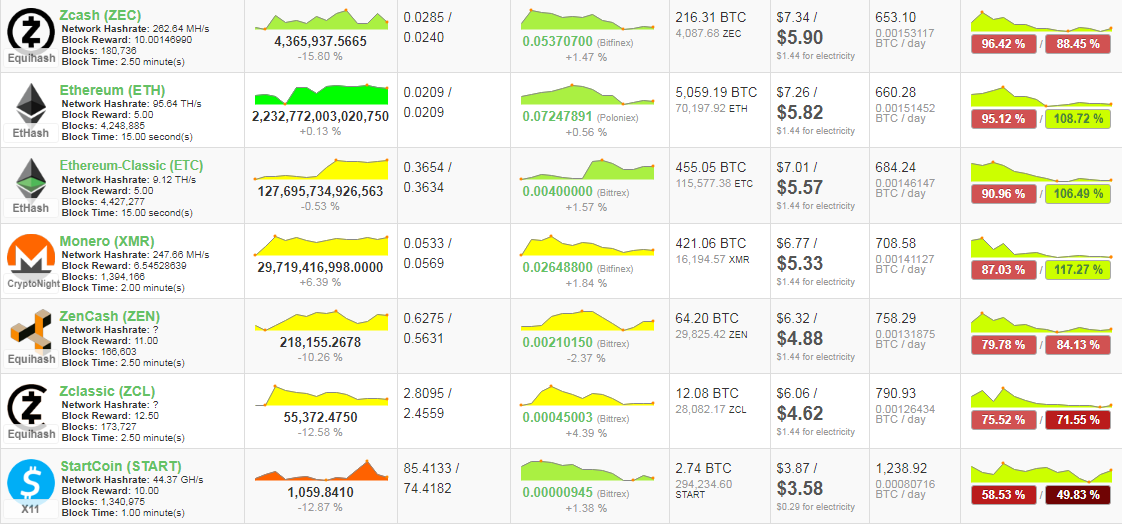
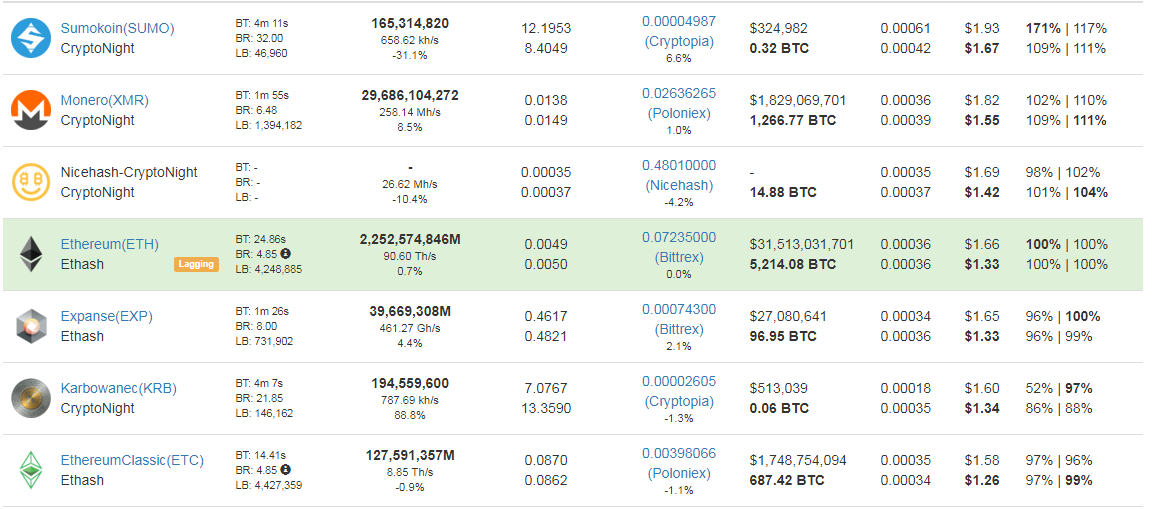
So ZEC and its forks ZCL ZEN are the best. Ethereum on second place.
Worth noting that ETH soon will go into PoS mode so mining this might be
historical soon.
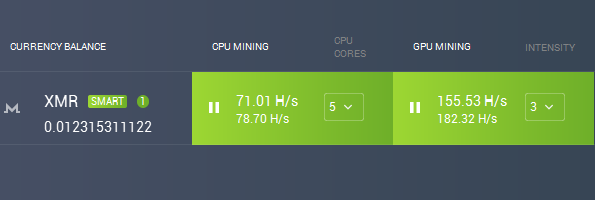
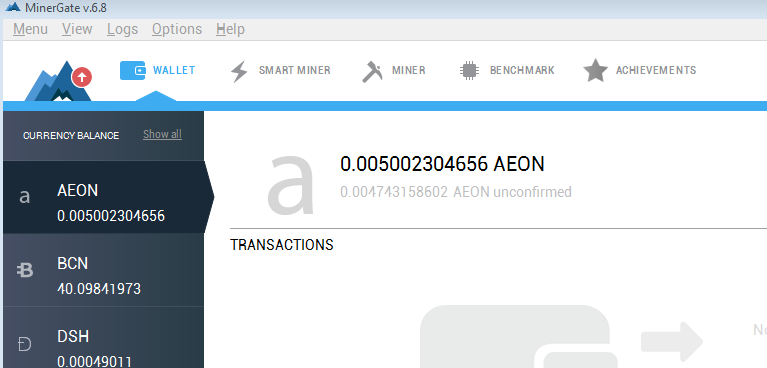
This guys in their auto app choose XMR for now for GPU and in CPU. Whats
cool in latest app version is that you can withdrawal coins mined right
from the app, dont need to get on website at all (need to register
first HERE).
Interestingly it says SUMO is the top coin for payment, then we have XMR (which SUMO is fork of) and then NiceHash.. Possibly people mine SUMO today for payments on those.
Summary
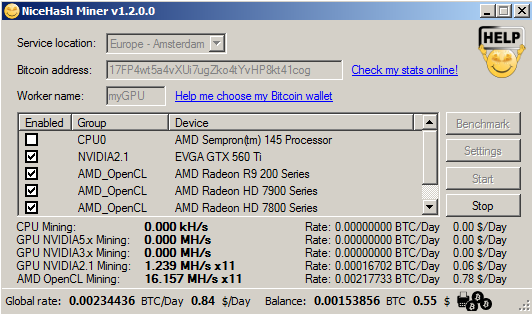
If you are very lazy go for MinerGate since they are on iMAC,Linux and Windows. If you are little less lazy and want better profits mine directly ZEC or use NiceHash but windows only or you have to point your miners ot them directly.
in CPU XMR Monero wins, no doubt in this.
This is a question that I have no answers. It's open for everyone to think about.
I came across this post today about our loss of a brilliant Steemian @lauralemons.
I seemed to see this name but cannot recall exactly. I wasn't
privileged enough to know her but obviously a lot of old Steemians know
her so I can feel their grief.
As I didn't know her, this post isn't about Laura. Just that the post
reminds me of my past experience of mourning a close relative of mine. A
few years back, I lost a younger cousin of mine. She was only a little
over thirty back then. Let's call her Angel.
Angel was the daughter of my mom's sister. She was a warm, caring and
optimistic person with always a smile on her face. Even she was
diagnosed with a troublesome disease at a very young age, her smile
wasn't seemed to be shadowed by this saddened incident. She and I
weren't in the same city, so we did not see each other often. Mostly
once a year during the new year holidays. But we feel close when we see
each other every time.
She was in the service industry for her entire career. She likes to
interact with people I guess although these kind of jobs don't get you
good salaries here. I have always admired her braveness as had this
happened to me, I would have been very depressed to even lead a normal
life. Later when I got married and later was blessed with a lovely baby
boy, Angel was there to cheer for us and very happy to be his auntie.
Angel did not get married probably due to her disease, so she shared her
love to those kids in the family including mine.
One day I was told that Angel passed away and I was speechless and
shocked. She was probably the first close relative of my generation to
pass away. How could it be? how could it? She was so young and
beautiful and caring and nice and everything... Why would God want to
take her away? Just like that. Life disappeared overnight. Without a
sign.
I didn't go to her funeral as my family thought we were so close. We
weren't and we were. I did not blame them for not letting me know. So I
might had cried for a few hours and was depressed for a few days but I
got over it as we did not really have very deep attachment.
Three months later. I received a message from facebook. Today is Angel's birthday! Write a birthday wish on her timeline ...
It was then I realize for the first time that people don't die on
facebook. They can live as long as facebook shall live. I checked all
the most recent messages on her page. Three months ago, there were a lot
of messages expressing condolences. Some were even told by these mourning and got shocked. How advanced are we to learn others' death from internet messages...
As I checked Angel's photos of her fantastic life (yeah, quite a lot
of places she had been to and a lot of cuisines she had eaten), I felt
relieved to see her had a good run but at the same time I knew that
facebook messages sometimes do not even come close to one's real life. I
could only hope for the better.
I wrote a few words for her as well. Still a happy birthday to her
although she had started another one. And said something like she will
always be on our mind. I had no one to say to except facebook version of
her.
I knew that at this time next year, facebook would notify me again.
As no one will ever want to turn that page off. Angel will always be
there. Always like that in her thirty's. She will not get old like we
will. One day her nephew will grow to be his auntie's age...
In this digital age, we can all have a version of us online, on the
blockchain maybe ... maybe even your entire life can be mostly recorded
in the future ... If the technology is going to gather more and more
information or even get an AI to mimic the dead, it will certainly make
us dizzy and wonder what death means then....
Still, at the bottom of my heart, I know that she had left. No matter
how many photos there are how many words she said there are... She was
long gone. And I can imagine that even an AI can pretend to be her to
some extreme standard, I can tell the difference.
The way we mourn our love ones' death is always the same. Never will
it change. What changes is only the format. Deep down there is no other
way for a human to mourn a human. If there is, we are not human any
more.
Sorry, the blockchain does not have answer this time. image - pixabay
今天意外看到這篇文章,說的是一個令人悲傷的消息,一位資深的Steemian @lauralemons過世了。我對於這名字有模糊的印象,但應該沒有什麼交集或淵源,只是看到許多老用戶在悼念她,同感到悲傷而已。
這讓我想到,多年前我一個表妹的過世。表妹是一個開朗樂觀、永遠臉上帶著微笑的小女孩。在我心中,她永遠是這樣一個可愛的女孩,只是後來我已經看不到她變老了。
表妹長年在南部,偶而也到過台北工作過幾年,但我們通常很少機會見面。過年時回老家,親戚聚會是最可能的場合。她總是笑咪咪,開朗迎人,我從不曾在她臉上看過哀傷。但造化弄人,表妹在年紀很輕時就被診斷出一種不好對付的疾病,當時我們知道後都感到十分震驚,但她臉上的笑容卻似乎從不曾受到影響。媽媽偶爾會更新她治療的情況,但我總是不忍多聽,後來似乎也穩定了,生活工作都可以如常。
她在餐飲類服務業工作,可能也是跟她喜歡與人互動有關,即使這行業在台灣並不容易出頭也不容易有高一點的薪水,她仍然樂在其中。聽到她一點一滴在累積自己的資歷,我們也為她感到高興。可能因為生病之故,她都沒有走向結婚這條路,就連男朋友也沒有聽人提起過。但她的愛可以分享給家人,我結婚時,生小孩時,她都參與其中且可以感受到她的真心歡喜。
幾年前某天,家人通知我,表妹過世了。一時之間,我感到無可置信。她還這麼年輕啊?上天為什麼要這麼殘酷呢?這麼好的一個人,這麼豐沛的愛,世界真的就這麼殘忍嗎?當時,死亡對我來說,都是七老八十的家族親長們,悲傷固然,悲痛不至於,這是生命的常態,說得過去。三十年華的表妹,說不過去,不合理,不應該。沒有人會回答你這問題。痛哭幾小時,再加上幾天的低落情緒後,我算是終於走出這情緒,畢竟我們不算真正有培養深厚的家人般的情感。面對這些,只能讓時間過去。
三個月後,我臉書接到一個訊息,通知我今天是表妹的生日,要我留言祝福。那是我第一次意識到,臉書可以讓你長生不老,永遠存在,只要伺服器不關。我都忘記我有她臉書了。於是我瀏覽著她臉書過去三個月來的訊息,三個月前,哀悼的訊息湧入,祝福她一路好走,下輩子再做朋友等等...
還有人明顯是到這裡才被通知死訊,震驚於此事的發生... 好殘忍的時代啊,臉書通知妳臉友的死亡...
我看著表妹過往的照片,她一如過往般的,似乎在三個月前的時光裡,仍那般快樂悠閒。拉拉拉拉,你可以上看她這幾年的生活,到哪裡去玩,吃了什麼東西,轉通知朋友什麼生活小訊息,開心跟其他朋友合照等等...
一切都還在,彷彿觸手可及...
雖然臉書所呈現的生活,跟真正的生活有可能是天差地別的,但我們作為生者,總是願意相信任何亡者曾經非常快樂的徵候,總是希望她不曾有過遺憾,走的時候快速而安靜,趕緊下一趟美好的旅程...
我也不免俗地留下紀錄。祝福她這一生的生日快樂,希望她下一生也早日快樂。告訴她,我們永遠會念著她。顯然是寫給我自己看的。她已經走了,不在臉書上了,但也許我們不知道,其實她看得見?那時我知道,明年此時,我還會收到通知,我相信祖克伯的工程師們。
沒有人會有動機想去關掉表妹的帳戶,家人尤其是。誰不希望能永遠看到她這樣的存在。她的臉書版本,會一直存在,她不會變老,我們才會。兒子長大了,他還不太記得的表阿姨可能漸漸跟他同一年紀。這世界,這數位的世界,甚至是這區塊鏈的世界,可以把人都數位化了,栩栩如生你看過嗎?相片比本人更真實。影像不用說,聲音不用說,甚至以後會有AI來模擬人的說話與表情?可能還能在我七十大壽時聽到表妹的祝賀?
天啊?那樣的世界又該怎麼面對?我們既不捨於亡者的離去,難道就能接受他們的永存?
內心深處,我知道表妹就是走了。在多相片、影音甚至AI都無法模擬。她早已經走遠了,我們也該離開了,彼此懷著記憶裡的愛離開吧。數位化、智慧化,都只是表象。
一個人類哀悼另一個人類的死亡,只能有一種方式。那就是讓時間遺忘傷痛,留下美好的記憶。或就是只是遺忘。
這是不會變的。如果有一天變了,那人類可能也不再是人類了吧?
區塊鏈今天請閉嘴吧。
Gorilla Glass and
Dragontrail Glass are both very hard and tough glasses. Both these
glasses are scratch resistant and are very difficult to break. Here I am
making a clear comparison between these two to find out what makes them
different from each other in terms of their properties and usage.
Lets First get to know what is Gorilla Glass, Sapphire glass, Tempered Glass & Dragontrail glass.
Gorilla Glass : Gorilla
glass is registered trademark of Corning Glass Company of USA, it’s a
alkali-aluminosilicate sheet toughened glass, it’s a special type of
glass which has following properties, its hard, thin, lightweight &
scratch resistant, after steve jobs used gorilla glass on Iphone,
gorilla glass became the choice of all high end device makers and used
in laptops, mobiles, tablets and other portable devices Gorilla
glass have different versions, like Gorilla glass 2 & newer and
better Gorilla glass 4, which is more shatter resistant the previous
generation glasses Also please note that its not the glass which is
scratch resistant but it’s the “secret” coating these manufacturer make
which gives the hardness along with the chemical process of making glass
bonds stronger
Dragontrail: Dragontrail is also a
alkali aluminosilicate glass which is made by Asahi Glass company of
Japan, Dragontrail is considered to be more resistant than gorilla glass
2 and suppose to resist scratch better, it can also support more weight
upto 60kg. although in drop tests it does not compare well against the
Gorilla glass. it can break more easily than GG3
Sapphire Glass: Sapphire
is not glass at all but it’s a crystalline material, sapphire glass is
made of synthetic sapphire which are made in labs. Synthetic sapphire is
generally made by applying incredibly high heat and pressure to
aluminum oxide powder and getting blocks of synthetic spphire, these
blocks are then cut and polished in screen sizes and this is what is
called a sapphire glass Sapphire is very hard and compared to
gorilla or dragontrail glass but sapphire transmits 6% less light. Also
its heavier than gorilla glass of same thickness.
Sapphire
glass is nothing new, infact high quality watches have been using
sapphire glass from a long time but the watch glass are usually 2 to 3
times thicker than the glass used on mobile devices. But all this has
now changed, as companies have found to produce sapphire glass as
screens. But sapphire are prone to shatters, they can shatter easily
compared to Gorilla Glass or Dragontrail glass.
Tempered Glass: Tempered
glass screen protectors are essentially toughened glass, they are heat
treated and chemically treated to make it stronger, it essentially is
same as a GG or Dragontrail glass but made to protect devices. it
contains different layers like silicon, PVC sheet between glass layers
to give it impact resistance. tempered glass are essentially meant to
give you the same glass feel of your device screen but to protect
against minor scratches, drops. thing to note here is that many tempered
glass vendors claim it to have hardness of 9, but those claims are
mostly false. they same similar hardness as your normal GG
Hardness levels: Now to understand what makes these glass resistant to scratches and so hard, we have to understand something called “Mohs scale of mineral hardness”
in layman terms, this scale means, anything that has hardness less than
the material will not scratch it. For example, quartz has hardness of 7
on Mohs scale, so a material likes copper will not be able to scratch
quartz Coppers Mohs scale of hardness is 3, while quartz is 7 (Please
note that Corning values on their official website on the Vickers
hardness scale, which is alternative to the Mohs scale)
Corning
gorilla glass has a Mohs hardness of 6 for Gorilla glass 2 and its
suppose to be 6.7 for newer Gorilla glass 3. Dragontrail glass has
hardness of around 6.5 on mohs scale while sapphire glass has hardness
of 8 ~ 9.
Now that we know the basics, lets clear few things Gorilla
glass, Dragontrail glass, even your Tempered glass and sapphire glass
will all scratch, sapphire will be the hardest to scratch but will
scratch none the less, so once you put them or have them dont expect
your device to be impervious to damage. treated glass may resist
scratches better but tend to shatter.
Finland has said it has “solved” the problem of refugee identity, using the Blockchain to record data of new residents.
As part of its commitment to support asylum seekers,
Finland is providing arrivals with a prepaid debit card instead of cash,
and linking the identity of cardholders to the Blockchain.
As Technology Review reports,
quoting Finnish Immigration Service director Jouko Salonen, the issue
of “strongly authenticated identity” is no longer a problem.
“We have found a way to solve that,” he told the publication.
The cards are the product of local startup MONI, and function more like a bank account replacement than a simple payment device.
In issuing them, Finnish authorities are able to track both
spending and identity with the added benefit that the Blockchain data
is immutable.
“Our purpose has always been financial inclusion, and
especially to help people in developing countries,” MONI CEO Antti
Pennanen added.
A cross-Europe effort to solve the problem of refugee identity is currently a topic of debate for the European Parliament.
A task force
is looking into the options for using the Ethereum Blockchain to
alleviate the problem, with the latest information showing an allocation
of €850,000 ($1 mln) for 2017 having been half spent.
“[...] EU governments in partnerships with other countries
and organizations (e.g. NGOs) need innovative solutions to manage
increasing flows of migrants and their temporary stay in different
countries,” the organization commented last month.”
How millennials use their smartphones in 2017, and the surprising reason for why they delete apps.
(Via BigStock)
Developers: Make sure your app logos are designed well, or else millennials may delete your product off their phones.
That’s one takeaway from comScore’s 2017 U.S. Mobile App Report that published Thursday and provides a fascinating look into the smartphone habits of Americans aged 18-to-34.
The study, which analyzed comScore digital audience data and survey
results, found that millennials “prove to be the most engaged,
sophisticated and addicted users of apps.” Those in the 18-to-24 age
bracket spend an average of 3.2 hours per day with apps — that’s nearly
50 days per year — compared to 2.3 hours for the average user. (Via comScore)
Compared to older age groups, millennials are much more interested in
discovering new apps, paying for apps, and making in-app payments —
about 20 percent download an average of one paid app per month. They are
also much more likely to delete an app because of thumbnail logo
designs — “because apps confer social identity, millennials will delete
an app if they don’t like how it looks on their screen,” the report
noted. More than 20 percent of millennials said they deleted an app in
the past year because of how it looked on their home screen. (Via comScore)
Nearly half of millennials use 21 or more apps per month, while about
75 percent say their smartphone would be “useless” without apps and say
they get an urge to open an app when they are bored. A majority of
millennials also said they check app notifications immediately after
receiving them. (Via comScore)
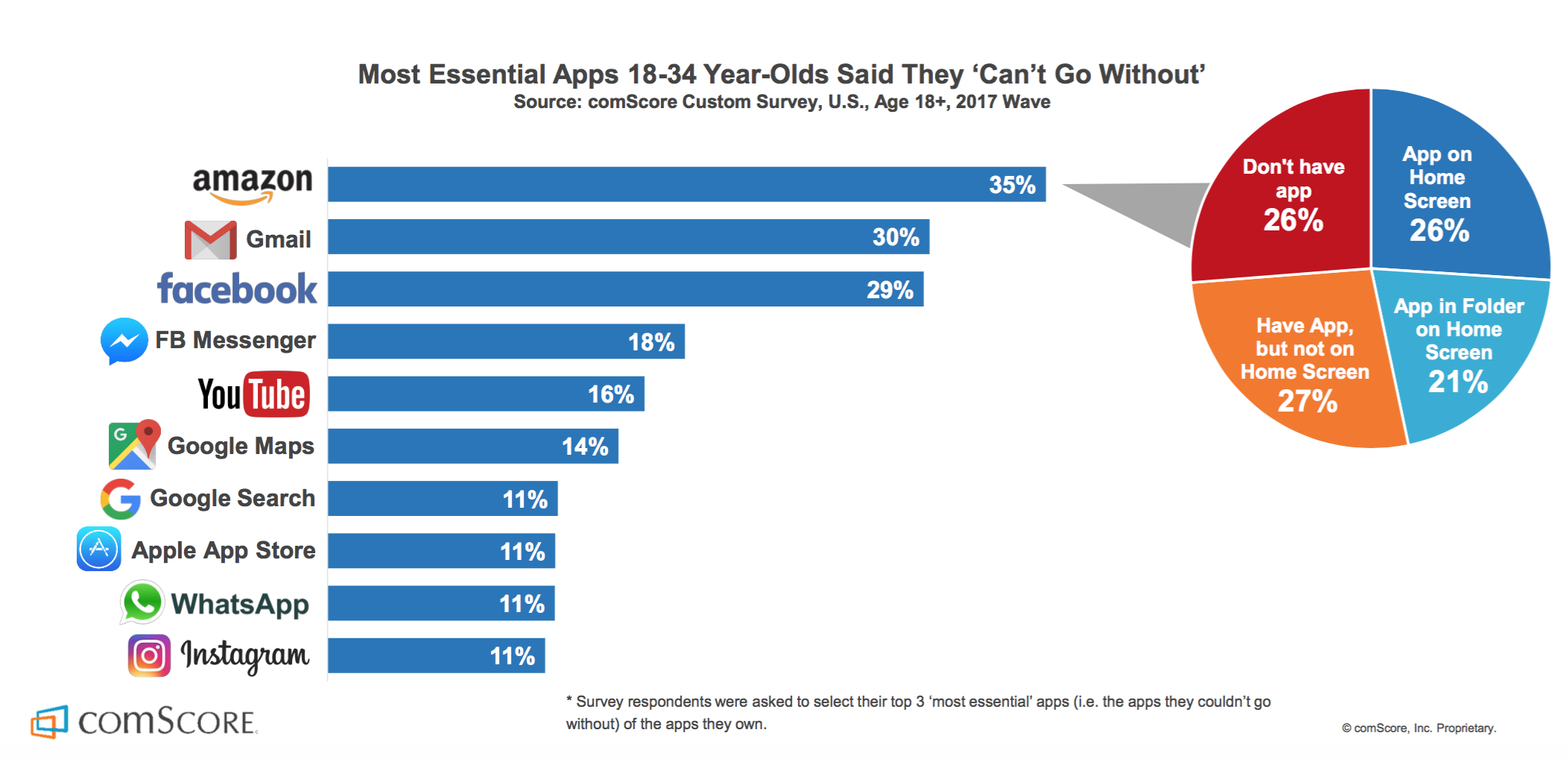
YouTube and Facebook topped the list of millennials’ most-used apps,
but 35 percent said Amazon is the app they “can’t live without.” (Via comScore)(Via comScore)
The report also analyzed how millennials are more likely to position
apps on their smartphones based on “thumb reach,” and are “increasingly
considering this dynamic.” And for my favorite slide of the report: App
users 55 years old and up are five times as likely than millennials to
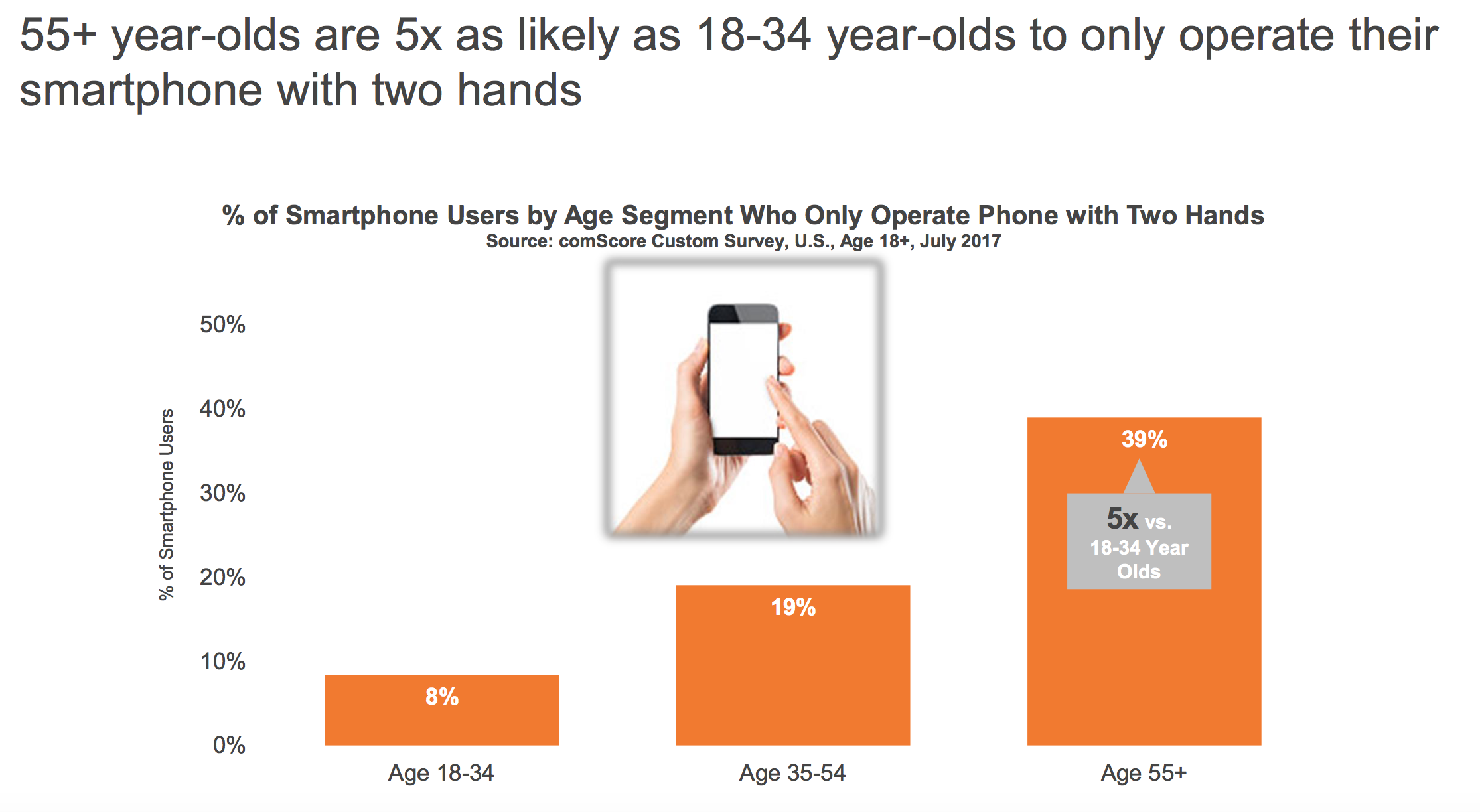
only operate their smartphone with two hands. (Via comScore).....
Security researchers at Google have discovered
a new family of deceptive Android spyware that can steal a whole lot of
information on users, including text messages, emails, voice calls,
photos, location data, and other files, and spy on them.
Dubbed Lipizzan, the Android spyware appears to be developed by
Equus Technologies, an Israeli startup that Google referred to as a
'cyber arms' seller in a blog post published Wednesday.
With the help of Google Play Protect,
the Android security team has found Lipizzan spyware on at least 20
apps in Play Store, which infected fewer than 100 Android smartphones in
total.
Google has quickly blocked and removed all of those Lipizzan apps and
the developers from its Android ecosystem, and Google Play Protect has
notified all affected victims.
For those unaware, Google Play Protect is part of the Google Play Store
app and uses machine learning and app usage analysis to weed out the
dangerous and malicious apps.
Lipizzan: Sophisticated Multi-Stage Spyware
According to the Google, Lipizzan is a sophisticated multi-stage spyware
tool that gains full access to a target Android device in two steps.
In the first stage, attackers distribute Lipizzan by typically
impersonating it as an innocuous-looking legitimate app such as "Backup"
or "Cleaner" through various Android app stores, including the official
Play store.
Once installed, Lipizzan automatically downloads the second stage, which
is a "license verification" to survey the infected device to ensure the
device is unable to detect the second stage.
After completing the verification, the second stage malware would root
the infected device with known Android exploits. Once rooted, the
spyware starts exfiltrating device data and sending it back to a remote
Command and Control server controlled by the attackers.
Lipizzan Also Gathers Data from Other Popular Apps
The spyware has the ability to monitor and steal victim's email, SMS
messages, screenshots, photos, voice calls, contacts,
application-specific data, location and device information.
Lipizzan can also gather data from specific apps, undermining their
encryption, which includes WhatsApp, Snapchat, Viber, Telegram, Facebook
Messenger, LinkedIn, Gmail, Skype, Hangouts, and KakaoTalk.
There's very few information about Equus Technologies (which is believed
to have been behind Lipizzan) available on the Internet. The
description of the company's LinkedIn account reads:
"Equus Technologies is a privately held company specialising in the
development of tailor made innovative solutions for law enforcement,
intelligence agencies, and national security organisations."
Earlier this year, Google found and blocked a dangerous Android spyware, called Chrysaor,
allegedly developed by NSO Group, which was being used in targeted
attacks against activists and journalists in Israel, Georgia, Turkey,
Mexico, the UAE and other countries.
NSO Group Technologies is the same Israeli surveillance firm that built the Pegasus iOS spyware initially detected in targeted attacks against human rights activists in the United Arab Emirates (UAE) last year.
How to Protect your Android device from Hackers?
Android users are strongly recommended to follow these simple steps in order to protect themselves:
Ensure that you have already opted into Google Play Protect.
Download and install apps only from the official Play Store.
Enable 'verify apps' feature from settings.
Protect their devices with pin or password lock.
Keep "unknown sources" disabled while not using it.
Keep your device always up-to-date with the latest security patches.