Friday, July 28, 2017

Google Detects Dangerous Spyware Apps On Android Play Store


android-spyware-app
Security researchers at Google have discovered a new family of deceptive Android spyware that can steal a whole lot of information on users, including text messages, emails, voice calls, photos, location data, and other files, and spy on them.

Dubbed Lipizzan, the Android spyware appears to be developed by Equus Technologies, an Israeli startup that Google referred to as a 'cyber arms' seller in a blog post published Wednesday.

With the help of Google Play Protect, the Android security team has found Lipizzan spyware on at least 20 apps in Play Store, which infected fewer than 100 Android smartphones in total.

Google has quickly blocked and removed all of those Lipizzan apps and the developers from its Android ecosystem, and Google Play Protect has notified all affected victims.

For those unaware, Google Play Protect is part of the Google Play Store app and uses machine learning and app usage analysis to weed out the dangerous and malicious apps.

Lipizzan: Sophisticated Multi-Stage Spyware


According to the Google, Lipizzan is a sophisticated multi-stage spyware tool that gains full access to a target Android device in two steps.

In the first stage, attackers distribute Lipizzan by typically impersonating it as an innocuous-looking legitimate app such as "Backup" or "Cleaner" through various Android app stores, including the official Play store.

Once installed, Lipizzan automatically downloads the second stage, which is a "license verification" to survey the infected device to ensure the device is unable to detect the second stage.

After completing the verification, the second stage malware would root the infected device with known Android exploits. Once rooted, the spyware starts exfiltrating device data and sending it back to a remote Command and Control server controlled by the attackers.

Lipizzan Also Gathers Data from Other Popular Apps


The spyware has the ability to monitor and steal victim's email, SMS messages, screenshots, photos, voice calls, contacts, application-specific data, location and device information.

Lipizzan can also gather data from specific apps, undermining their encryption, which includes WhatsApp, Snapchat, Viber, Telegram, Facebook Messenger, LinkedIn, Gmail, Skype, Hangouts, and KakaoTalk.

There's very few information about Equus Technologies (which is believed to have been behind Lipizzan) available on the Internet. The description of the company's LinkedIn account reads:
"Equus Technologies is a privately held company specialising in the development of tailor made innovative solutions for law enforcement, intelligence agencies, and national security organisations."
Earlier this year, Google found and blocked a dangerous Android spyware, called Chrysaor, allegedly developed by NSO Group, which was being used in targeted attacks against activists and journalists in Israel, Georgia, Turkey, Mexico, the UAE and other countries.

NSO Group Technologies is the same Israeli surveillance firm that built the Pegasus iOS spyware initially detected in targeted attacks against human rights activists in the United Arab Emirates (UAE) last year.

How to Protect your Android device from Hackers?


Android users are strongly recommended to follow these simple steps in order to protect themselves:
  • Ensure that you have already opted into Google Play Protect.
  • Download and install apps only from the official Play Store.
  • Enable 'verify apps' feature from settings.
  • Protect their devices with pin or password lock.
  • Keep "unknown sources" disabled while not using it.
  • Keep your device always up-to-date with the latest security patches.

Saturday, July 15, 2017

Microsoft’ Calibri font hinges Pakistan’s entire government


Microsoft’ Calibri font hinges Pakistan’s entire government


It is probably the first time that the news regarding a corruption case surrounding Pakistani government involves a Microsoft font and the world-renowned encyclopedia website Wikipedia as the corruption scandal escalates to new heights threatening the country’s government.

The Panama leaks

As many of you may know, earlier in 2016, a hoard of documents dubbed as ‘Panama Papers’ was leaked which enlisted the customers of a law firm who were using its services to handle offshore companies.
Among the customers, were the children of the current Prime Minister Nawaz Sharif. And among the children, was Sharif’s daughter, Maryam Nawaz, who was apparently linked to an offshore firm.
Maryam Nawaz
The case ended up in the hands of Pakistan’s Joint Investigation Team (JIT) after a long period of trials with the Supreme Court. The investigation culminated in a report being released on Monday, the 10th of July 2017.

The report and the Calibri font

In the report, Maryam Nawaz did claim to have ties with the firm called Nielson and Nescoll Ltd; however, there was just one problem with the documents.
The documents provided by Maryam Nawaz were written in the Calibri font and were dated sometime in 2006, apparently proving Maryam Nawaz’s claims regarding the firm.
However, an investigation into the matter revealed that the font was in fact, not available until 2007. This implied that the documents were fake.

The rush to Wikipedia

As soon as this was revealed, interested parties searched Wikipedia for details and found that the Calibri font was actually available in 2004, albeit, was not publicly released.
The public release was made in Microsoft Office 2007, as stated by investigators who believe that the documents are incorrectly dated. Around 60,000 people have visited the article since the controversy was made public.
The statement that the font was available in 2004 is what is causing all the hype in public media. However, according to a report, Dawn approached the designer of the font and found out that the font was indeed established in 2004 and delivered to Microsoft.
Also, public betas were released in 2006 according to the source. One of the representatives of LucasFonts stated that even though the public beta version was available, it is highly unlikely that someone would use a beta version of the font to create official documents.
Panama leaks chart against Shareef family’s corruption

Wikipedia locks article

As a result of the controversy, Wikipedia administrators initiated a vote in favor of or against locking the article from being edited openly.
Usually, articles on Wikipedia can be edited by anyone anonymously. However, sensitive content such as that related to President Donald Trump or the Israeli-Palestine conflict cannot be edited as such. Wikipedia has currently shut down open editing of the respective article.
The ban was supported by one major Wikipedia editor, Saqib Quyyam, who stated that he intended to prevent anonymous groups from editing the article with information that was doubtful.

Response from Maryam Nawaz

As a response to the controversy, Maryam Nawaz tweeted a Quora page which mentioned that the font was available in 2004. She also tweeted that “Every contradiction will not only be contested but decimated in [the Supreme Court].” The group has therefore refused to resign from office.

Friday, July 14, 2017

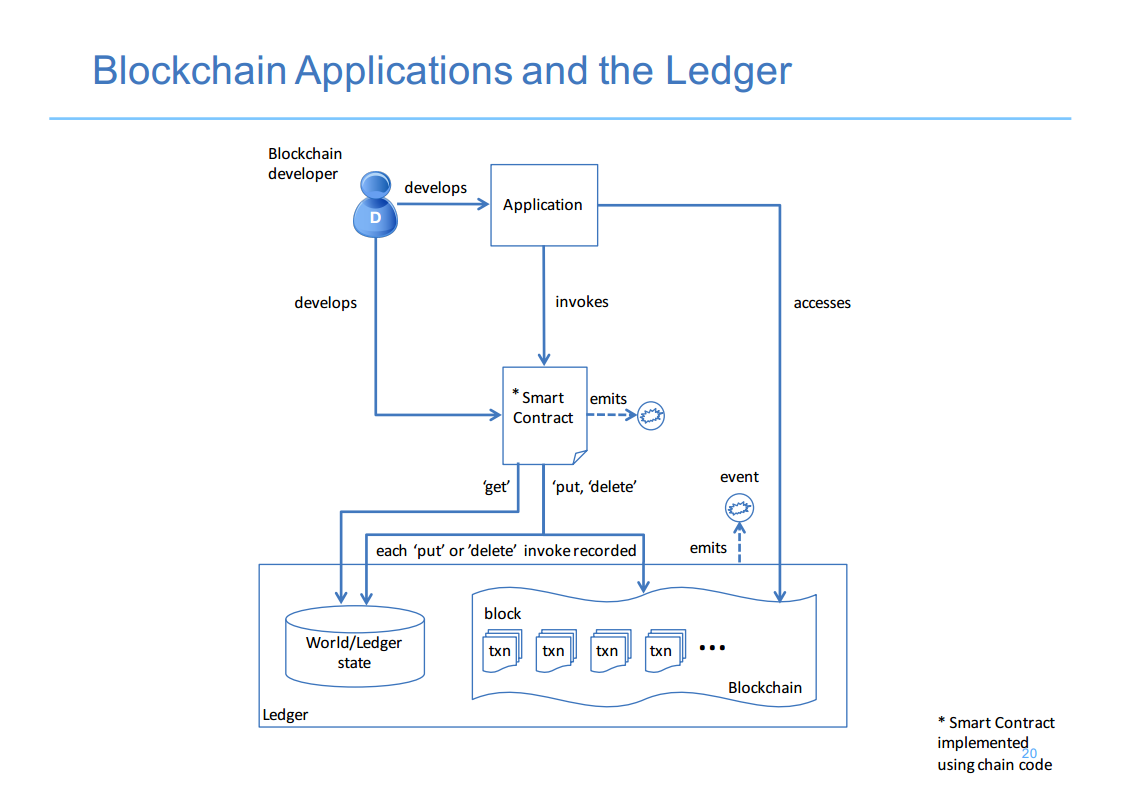
Two Banks have successfully used Blockchain for Commercial Property Lease


ANZ and Westpac coupled with IBM and shopping mall operator Scentre Group to digitize the guarantee process.
The trial used scattered ledger technology to replace paper-based evidence documents, following in a single source of information with decreased potential for cheating and improved efficiency.
The use of blockchains, used to allow the digital currency Bitcoin, suggests you can show where data has come from and gone to, generating new economic movement in areas such as financial services, supply chains, and state registries.
Data61, a design of Australia’s peak science institution, the CSIRO, has been investigating how blockchain technology could be employed in Australia to deliver productivity benefits.
The ASX is also thinking of replacing its CHESS properties clearing and settlement system with blockchain.
Mark Bloom, chief financial officer at Scentre Group, says a renew of the decades-old process for issuing, tracking and maintaining on guarantees is long overdue.
“With approximately 11,500 retailers across Australia and New Zealand who study evidence to support rental obligations, manual tracking of support has been an extremely cumbersome and energy intensive process,” he says.
Nigel Dobson, the ANZ’s general administrator wholesale digital, says the bank has remained keen to avoid the hype circling blockchain and instead has concentrated on the practical.
“This proof of concept demonstrates how we can collaborate with our partners to develop a digital solution for customers, which also has the potential for industry-wide adoption,” he says.
Andrew McDonald, general director corporate and institutional banking at Westpac, says the new process is about eliminating the cost of fraud, error and operational risk.
“Next steps include supporting all industry players to embrace this technology so we can properly protect and save money for our customers,” he says.
“Beyond that, there is no reason why this couldn’t be used across other industries.”
At IBM, Dr. Joanna Batstone, director of IBM Research Australia, says she thinks blockchain can probably drive productivity across all Australian industries.
Take your time to comment on this article.

Tuesday, July 11, 2017

SpyDealer Rooting Malware Steals Data From Android Devices

SpyDealer is one of the most powerful Android malware.

Capable of intercepting data from more than 40 apps, the SpyDealer malware has been recently discovered by researchers at the Palo Alto network. The malware has a number of capabilities that allow it to extract personal information from a compromised Android device.

SpyDealer versions

According to the researchers, the malware has different versions. They are 1.9.1, 1.9.2 and 1.9.3. The latest version of the malware, 1.9.3, has all the configuration settings encrypted and contains an accessibility service which allows it to decrypt app databases.
The researchers reported that the malware was probably in digital space since October 2015, given the data obtained from infected devices.
Also, the malware infects Android versions 2.2 till 4.4. Data suggests that 25% of the Android devices are still running on these versions. Nevertheless, the malware can work with later versions as well but with fewer privileges.
Up till now, the malware takes data from 40 different apps that include Facebook, WeChat, WhatsApp and other social media and messaging apps. The malware is codenamed as GoogleUpdate and is available via third-party app stores.
It is not on Google Store which means that users need to be wary of app offerings from unknown app stores.

What does it do?

SpyDealer has a very sophisticated system which allows it to record audio and video, receive calls automatically, retrieve personal messages, determine a person’s exact location along with taking photos.

How does it work?

The malware works by gaining privileges in the infected device. It does this by rooting the device. The exact method by which the malware is installed in the system is not known. However, the following process has been revealed.

Launch

The infected device is registered with two broadcasting receivers that listen for certain events to take place. One event is when the device boots up while the other occurs whenever a network connection is established.
If either of the two events occur, the AaTService is launched which subsequently retrieves the readme.txt files that contain all the configuration for the malware.
The file contains the IP address of the C2 server from which the malware gets instructions, the commands for mobile networks and the commands for Wi-Fi networks.

Rooting

According to Palo Alto Network, once the configuration file is downloaded, the rooting procedure is then started. Versions 1.9.1 and 1.9.2 use the exploits from Baidu Easy Root to gain root privilege. Baidu Easy Root is a third-party commercial app that is usually used to jailbreak a device.
It is mainly used to allow users to access certain settings of their phones that would otherwise be impossible due to security protocols.
The malware essentially downloads a file called raw.zip which contains all the exploits featured in Baidu Easy Root 2.8.3.
Version 1.9.3 along with the other two also use another method to gain root privileges. However, this method does not use Baidu Easy Root. Rather, the procedure executes the files ‘png’ and ‘toor.sh’ to gain root access.

Persistence

After rooting the target device, the malware executes a file called power manager which creates a backup of the malware. Whenever a user tries to uninstall the malware, it gets reinstalled after which it executes its code.

Connecting with the server

The malware then establishes a connection with remote C2 servers or passively receives commands. There are essentially three channels through which it communicates with the servers; SMS, TCP, UDP.
The SMS channel uses a broadcasting receiver that listens for incoming SMS messages. These messages contain the commands that are to be executed.
Similarly, the TCP connection passively listens for commands from the 396568 port.
The UDP connection, on the other hand, actively establishes a connection with the remote server and receives encrypted commands allowing the attacker to exfiltrate various types of information.

Reading text messages in real time

Many apps encrypt the data that is being transmitted through them. This prevents hackers from hijacking a person’s messaging service. SpyDealer, however, uses accessibility service to receive plain text messages from the screen directly.
The accessibility service is enabled remotely since the attacker has root privileges in the target device.

The ultimate cyber-espionage

As mentioned earlier, SpyDealer spies on a victim using a number of different techniques.
It records phone calls and any surrounding audio. To do so, the malware uses a PhoneStateListener to listen for any incoming calls.
Also, the malware records a video through both the rear and front cameras of the infected device. Since Android devices require a preview for recording video, the malware creates a small preview surface measuring 3dip x 3dip in size.
Furthermore, SpyDealer can secretly take photos as well and again creates a small preview surface in order to prevent the user from noticing that a picture is being taken.
Also, an attacker can configure the malware to answer phone calls automatically.
Lastly, the geographic location of the victim can be determined through the malware which uses the phone’s GPS. This functionality is activated whenever the phone’s screen is turned off, and the procedure stops as soon as the screen comes on.
This allows the malware to go undetected since the GPS status bar appears to be inactive to the user. Moreover, the map service of Baidu Easy Root is also by the malware to determine the location based on GSM.
All of the information thus gained is saved in a file with appropriate formats and uploaded to the attacker’s servers.

Vulnerabilities Found in Pre-Installed Dell Software

Critical Vulnerabilities Found in Pre-Installed Dell Software

With so much of news surrounding major global malware attacks such as the recent NotPetya incident, not much has been talked about some flaws that exist within the popular Dell software.

Security flaws that require immediate update

Before letting you know about the technical details of the vulnerabilities, it is important to note that those with Dell devices are advised to upgrade the Dell pre-installed software immediately so as to prevent any major accidents.
Given that many businesses use the Dell system, it is strongly recommended that the respective IT administrators install the latest updates before things get messy.

Three different vulnerabilities

Security researcher, Marcin Icewall Noga, who works at Cisco Talos, Cisco’s security intelligence unit, discovered three vulnerabilities in Dell’s pre-installed software. Let’s have a look at what these vulnerabilities are.

CVE-2016-9038

The first vulnerability is associated with privilege rights to the system. In essence, the CVE-2016-9038 is a vulnerability that provides an attacker the privileges to a local system. The vulnerability is present in the SboxDrv.Sys driver.
An attacker can send custom data to the SandboxDriverApi device driver that comes with a Dell device. The vulnerability allows read and write capabilities to the attacker. If carried out correctly, the attacker gains privilege escalation.
Also, Noga stated that the fault not only exists with the device driver but also with Workspace 6.1.3-24058 and Invincea-X.

CVE-2016-8732

The CVE-2016-8732 is a vulnerability which virtually allows an attacker to disable protection protocols in Dell’s systems. The software associated with the vulnerability is the Dell Protected Workspace 5.1.1-22303 with InvProtectDrv.sys driver containing further vulnerabilities.
The driver has inferior protection and lacks proper validation. The attacker can, therefore, use the vulnerability to infect a system by executing applications that will disable certain security protocols, allowing the attacker to infiltrate a system.

CVE-2017-2082

Also a protection bypass vulnerability, the CVE-2017-2082 involves Dell’s PPO service and allows an attacker to execute arbitrary code.
Initially, the vulnerability arises as a result of poaService.exe searching for the DLL library called atiadlxx.dll. The attacker can, however, use a customized version of this library file and run arbitrary code.
Nevertheless, version 4.0 comes with a patch and users are recommended to update their systems as quickly as possible.

Update:

The good news is that Dell has addressed the issue and the vulnerability has been mitigated through a Dell Command update.

Wednesday, June 21, 2017

Android Gingerbread Will Crumble on WhatsApp in 2020

It's the end of an era. Facebook's WhatsApp just announced that older Android devices equipped with the Gingerbread operating system will no longer be able to use the messaging app as of February 1, 2020.
Gingerbread constitutes just 0.8% of Android usage, so it's no surprise that WhatsApp is phasing it out. It's a little astonishing that the app will even support devices with this older OS for so long. It was previously reported that Facebook was considering killing off support for Gingerbread on WhatsApp in 2016, but these plans have since changed significantly.
With the reveal of WhatsApp's updated platform support plans, we now have a timeline of when older operating systems and software platforms will be cut off. In 2017, Nokia Symbian S60, Blackberry OS & 10, and Widows Phone 8.0 and older will all lose support. Nokia S40 will succumb to the same fate in 2018, followed by Android versions 2.3.7 and older — including Gingerbread — in 2020.
The blog post explaining these changes carefully noted that while WhatsApp will continue to work on the Gingerbread OS until 2020, it's not guaranteed to work well.
Because we will no longer actively develop for these platforms, some features may stop functioning at any time.
These changes will only affect the few who still use these operating systems, so it's likely that you'll be able to continue using WhatsApp for years to come. Although many WhatsApp users in foreign countries have slightly older phones, the global popularity of Android and iOS — 99.6% of all smartphones run Android or iOS — means that only those with very old Android devices will be impacted. WhatsApp did not mention plans to cut off any versions of iOS in this announcement, so Apple users can rest easy ... for now.

By Sarah

Tuesday, June 20, 2017

How to Speed Up Firefox With Multi-Process, If It's Not Working By Default


enable-firefox-multiprocess-feature

After years of waiting, Mozilla last week launched Firefox 54 for Windows, Mac, Linux, and Android, with multi-process support — a "major improvement" to improve your browsing experience — but many users are still struggling to take advantage of this feature.

Mozilla's multi-process support in Firefox has been in development for over eight years as part of a project, code named Electrolysis or E10S, which aimed at improving responsiveness and speed by streamlining memory use by different processes.

Describing the latest release as the largest change to Firefox code ever, Mozilla says it has worked hard to avoid increased memory consumption, and slower performance, as Firefox now uses up to four processes to run web page content across all open tabs.
enable-firefox-multiprocess-6
In other words, Firefox is finally making use of "significantly less RAM" of your computer, as heavy web pages in one tab will now have a much lower impact on responsiveness and speed in other tabs.
"This design makes it easier to utilize all of the cores available on modern processors and, in the future, to securely sandbox web content," says Mozilla. "It also improves stability, ensuring that a single content process crashing won't take out all of your other tabs, nor the rest of the browser."
This feature is about to be enabled by default with Firefox 54, but many Firefox users are unable to take advantage of multi-process support and disappointed to see that their web browser is clinging to a single process.

This issue is happening because one or more of your installed Firefox add-ons could be incompatible with Electrolysis, or multi-process feature.

Step 1 — Check If Multi-Process is Working

enable-firefox-multiprocess--3
To check whether or not Firefox multiprocess feature is working fine, visit about:support in the address bar and look for the "Multiprocess Windows" line (as shown):

  • If it says "1/1 (Enabled by default)" — multi-process feature is working.
  • If it says "0/x (Disabled by add-ons)" — multi-process is not working.

Step 2 — Disable/Remove Incompatible Add-Ons

enable-firefox-multiprocess-2

To find out the list of incompatible add-ons to see which of your extensions is at fault, install "Add-on Compatibility Reporter add-on" provided by Firefox.

Step 3 — Enable Firefox Multiprocess Feature

enable-firefox-multiprocess-4
In order to manually fix this issue and enable Electrolysis feature, you first need to disable or completely remove incompatible add-ons from your browser.

Now, enable Electrolysis feature in Firefox using the following steps:
  • Type about:config in the address bar
  • Search for browser.tabs.remote.autostart
  • Double-click on it and set value to True

Step 4 — Change No. of Content Processes

enable-firefox-multiprocess-5
You can also change the number of content processes, which is by default 4, to more or less, according to your pool of RAM.

  • Visit about:config
  • Search for dom.ipc.processCount
  • Set its value to more than 1

That's it. You are done.

You do not need to restart your web browser for this to take effect.
enable-firefox-multiprocess

No doubt, this change will let Google Chrome users rethink to shift on Firefox, as by default Chrome starts a new process for every tab, thus using an infinite number of processes, which eventually slow down the web browser as well as the operating system to a crawl.
"We are pushing forward in building a completely revamped browser made for modern computing. It's our goal to make Firefox the fastest and smoothest browser for PCs and mobile devices," Mozilla says. "Through the end of 2017, you'll see some big jumps in capability and performance from Team Firefox."
Firefox 54 is available to download in the stable form, while Firefox 55, which further refines the process, is available only to developers.
by Mohit Kumar